How the System Works
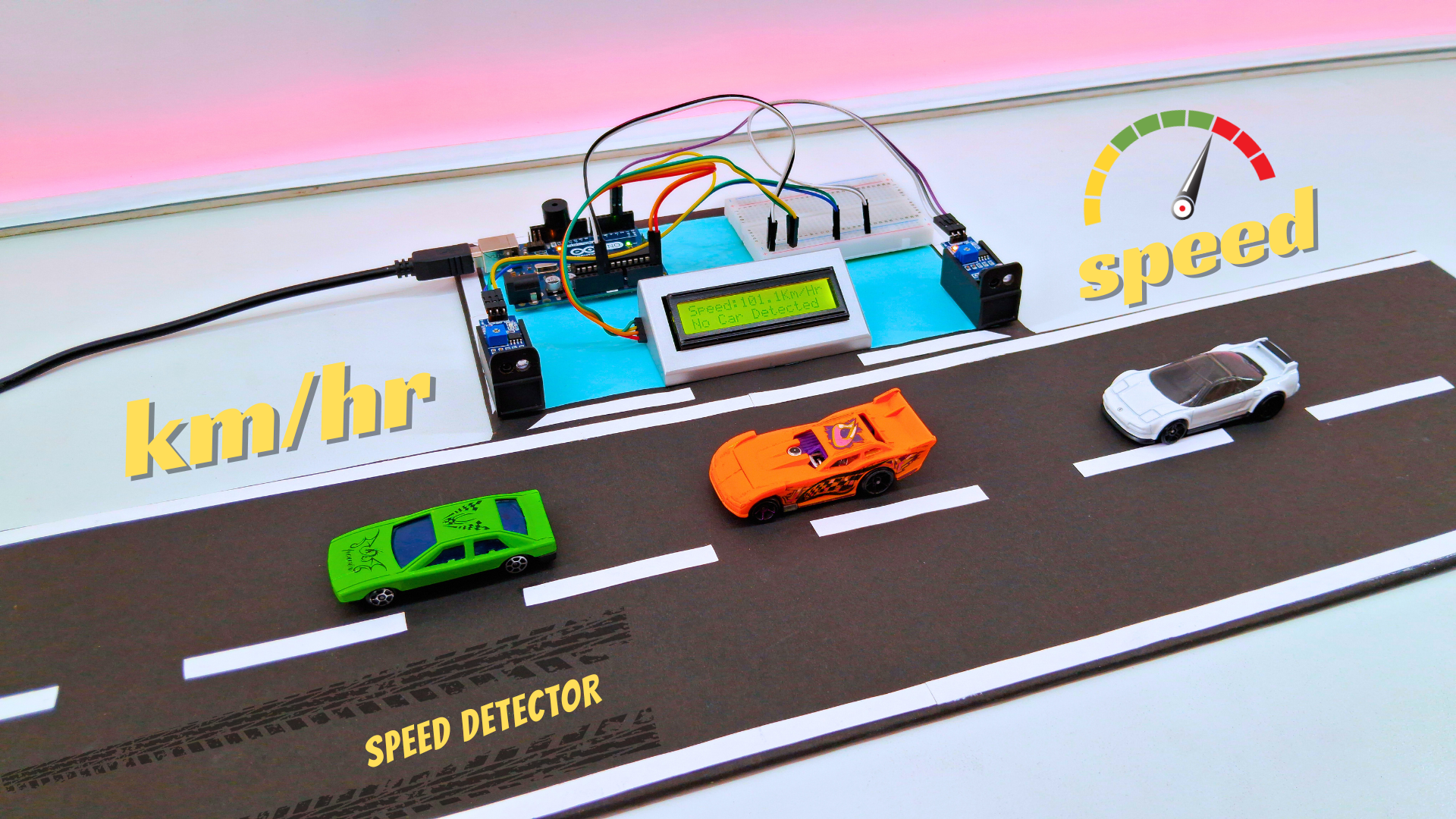
- Two IR sensors are placed 20 cm apart on a simulated road setup
- When a vehicle passes the first sensor, a timer starts
- The timer stops when the vehicle passes the second sensor
- Speed is calculated using the formula: Speed = Distance / Time
- The system scales the measurement to simulate a 5-meter distance for practical application
- Speed is converted to km/h and displayed on the LCD
- If speed exceeds 50 km/h, the buzzer sounds and displays “Over Speeding”
- For normal speeds, the display shows “Normal Speed”
Materials Required
- Arduino UNO
- IR Sensors
- LCD Display with I2C Module
- Mini Breadboard
- Jumper Wires
- Buzzer
- MDF Board
Step-by-Step Assembly
1. Setup the Road Simulation:
- Cover an MDF board with black paper to simulate road surface
- Add white paper strips as road markings for realistic appearance
- Mount the two IR sensors exactly 20 cm apart
2. Wiring the Circuit:
- Connect the first IR sensor to pin 2 of Arduino
- Connect the second IR sensor to pin 3 of Arduino
- Connect LCD I2C module to SDA (A4) and SCL (A5) pins
- Connect buzzer to pin 11
- Use breadboard for power distribution (5V and GND connections)
3. Arduino Code:
- Upload the provided Arduino code
- Adjust speed threshold (50 km/h default) if needed
- Modify scaling factors for different simulation distances
4. Testing the System:
- Move an object (or toy car) past both sensors
- Verify speed calculation and display on LCD
- Test buzzer activation when exceeding speed limit
- Check “Normal Speed” display for compliant speeds
Circuit Diagram
Arduino Code
Once the circuit is set up, upload the following code to the Arduino UNO using the Arduino IDE.
#include <LiquidCrystal_I2C.h>
#include <Wire.h>

LiquidCrystal_I2C lcd(0x27, 16, 2);

float timer1;
float timer2;
float Time;

int flag1 = 0;
int flag2 = 0;

const float ACTUAL_DISTANCE = 0.2;  // Real distance: 20 cm (0.2 m)
const float SIMULATED_DISTANCE = 5.0; // Fake distance for scaling (5 m)
float speed;

int ir_s1 = 2;
int ir_s2 = 3;
int buzzer = 11;

void setup() {
  Serial.begin(9600);
  lcd.init();
  lcd.backlight();
  pinMode(ir_s1, INPUT);
  pinMode(ir_s2, INPUT);
  pinMode(buzzer, OUTPUT);

  lcd.clear();
  lcd.begin(16, 2);
  lcd.setCursor(0, 0);
  lcd.print("   WELCOME TO ");
  lcd.setCursor(0, 1);
  lcd.print("Simple Circuits ");
  delay(2000);
  lcd.clear();
}

void loop() {
  if (digitalRead(ir_s1) == LOW && flag1 == 0) { timer1 = millis(); flag1 = 1; }
  if (digitalRead(ir_s2) == LOW && flag2 == 0) { timer2 = millis(); flag2 = 1; }

  if (flag1 == 1 && flag2 == 1) {
    if (timer1 > timer2) { Time = timer1 - timer2; }
    else if (timer2 > timer1) { Time = timer2 - timer1; }
    Time = Time / 1000; // Convert ms to seconds

    speed = (ACTUAL_DISTANCE / Time); // Speed in m/s
    speed = speed * (SIMULATED_DISTANCE / ACTUAL_DISTANCE); // Scale up
    speed = speed * 3.6; // Convert to km/h
  }

  if (speed == 0) {
    lcd.setCursor(0, 1);
    if (flag1 == 0 && flag2 == 0) { lcd.print("No Car Detected"); }
    else { lcd.print("Searching...    "); }
  }
  else {
    lcd.setCursor(0, 0);
    lcd.clear();
    lcd.print("Speed:");
    lcd.print(speed, 1);
    lcd.print("Km/Hr  ");
    lcd.setCursor(0, 1);
    if (speed > 50) { lcd.print("  Over Speeding  "); digitalWrite(buzzer, HIGH); }
    else { lcd.print("  Normal Speed   "); }
    delay(3000);
    digitalWrite(buzzer, LOW);
    speed = 0;
    flag1 = 0;
    flag2 = 0;
  }
}Code Explanation:
Setup:
Initializes the LCD display, IR sensors, and buzzer. Sets up the welcome message that displays for 2 seconds on startup.
Loop:
Continuously monitors both IR sensors. When a vehicle is detected at the first sensor, it starts a timer. When detected at the second sensor, it stops the timer and calculates the speed using the time difference. The speed is then scaled to simulate a longer distance (5 meters) and converted to km/h. If the speed exceeds 50 km/h, it triggers the buzzer and displays an over-speed warning.
Why Choose This Design?
- ✅ Accurate Measurement: Precise speed calculation using time difference between two points
- 🚗 Realistic Simulation: Scaled to simulate actual road conditions despite small physical setup
- 📊 Clear Display: LCD shows speed in km/h with clear status messages
- ⚠️ Safety Alert: Audible buzzer warning for speeding vehicles
- 🛠️ DIY Friendly: Simple components and wiring, no soldering required
- 📱 Educational: Great for learning about sensors, timing, and physics calculations