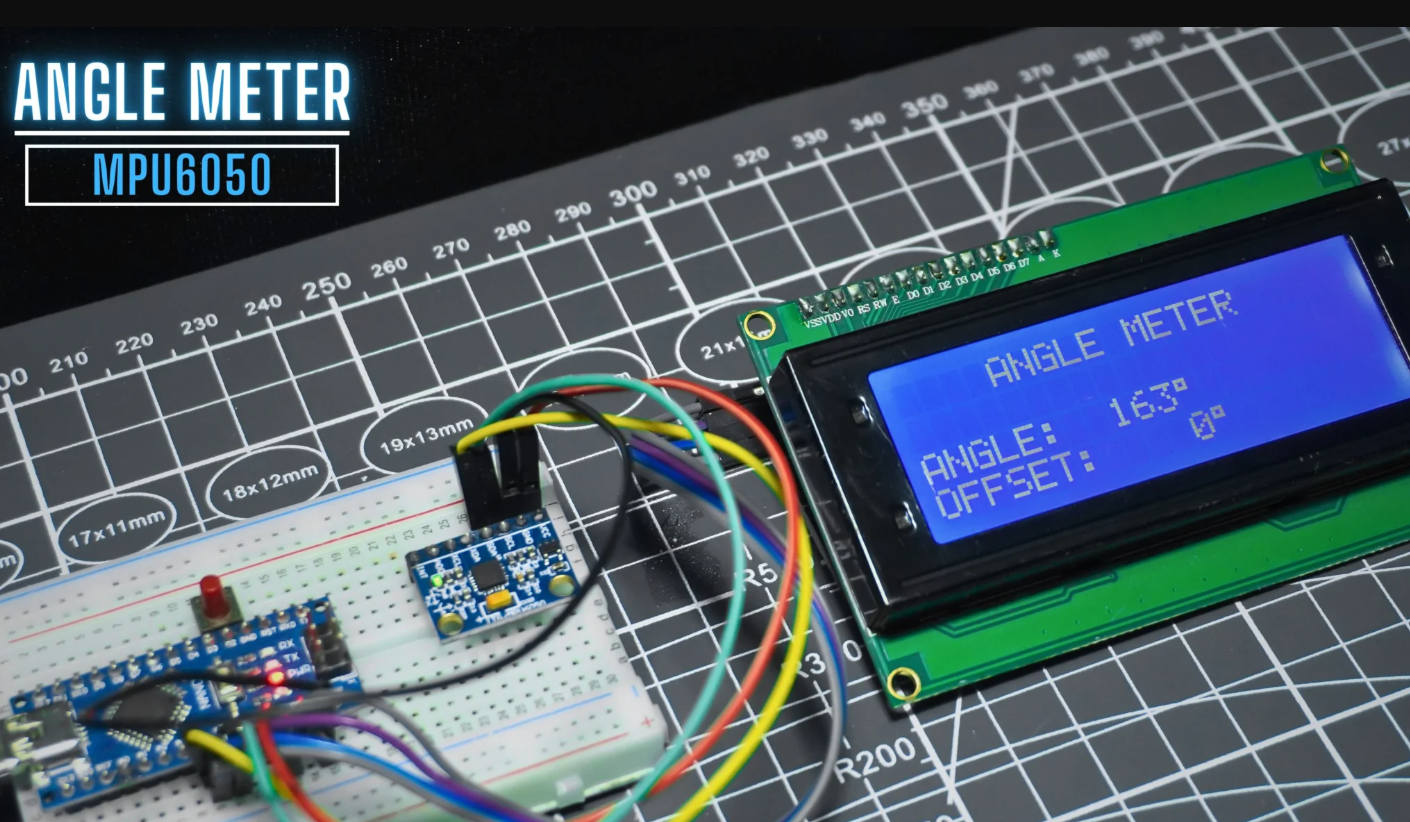
Measuring precise angles is a vital requirement in engineering, robotics, structural analysis, and everyday DIY projects. Traditional mechanical angle meters, such as spirit levels and protractors, are widely used but often limited by mechanical tolerances, slow readouts, and lack of digital integration. Enter the world of digital instrumentation—where affordable sensors and powerful microcontrollers like Arduino transform how angles are detected and displayed in real-time.
In this comprehensive project tutorial, discover how to build a DIY angle meter leveraging the highly accurate MPU6050 sensor, which combines a 3-axis accelerometer and gyroscope, and Arduino boards known for their open-source flexibility. This project empowers makers, students, and engineers to create a cost-effective, portable, and customizable angle measurement device that delivers sub-degree precision, real-time digital outputs, and easy interfacing with other systems. Not only is this tool invaluable for machinery alignment, construction, and scientific research, it also opens the door to integrating angle sensing into larger automation or IoT applications.
Learn the core principles–from component selection and sensor calibration to code implementation and error minimization—grounded in 2025 SEO best practices. This guide ensures authoritative, trustworthy, and actionable knowledge optimized for Google’s AI snippets, People Also Ask, and voice/zero-click search.
Project Overview – Digital Angle Meter Using Arduino and MPU6050
What is an Angle Meter?
An angle meter, also known as a clinometer, is a tool for measuring angles or the slope of an object. While traditional angle meters include tools like protractors, modern digital versions offer enhanced capabilities. A DIY digital angle meter using an Arduino and an MPU6050 sensor provides a versatile, accurate, and cost-effective solution for makers and professionals alike.
Why Choose Arduino and MPU6050?
This project leverages the MPU6050, a sophisticated sensor that combines a 3-axis gyroscope and a 3-axis accelerometer. This allows it to accurately measure orientation and angular velocity. Paired with a versatile microcontroller like the Arduino, you can create a powerful and customizable digital angle meter.
👉 If you’re interested in a simpler version, check out our Angle Meter using ADXL335 Accelerometer project, which demonstrates tilt measurement with an Analog sensor instead of a digital MPU6050.
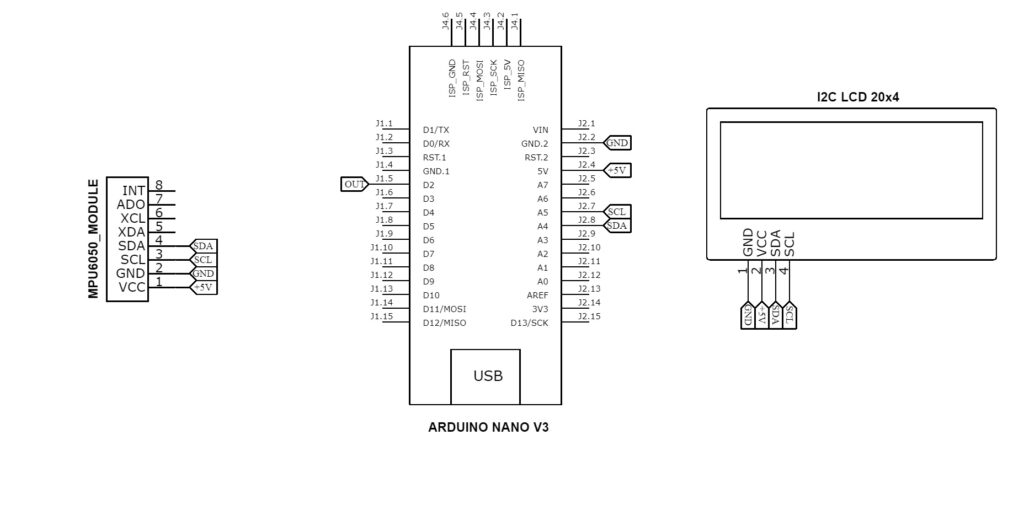
Circuit Diagram
Components Required (Bill of Materials)
- Arduino Nano
- MPU6050 Gyroscope + Accelerometer Sensor
- 20×4 LCD Display
- I2C Display Module
- Breadboard
- 2x 3.7V Lithium Ion Battery
- Battery Holder
Circuit Connections
To create a functional angle meter using an Arduino and an MPU6050 sensor, you’ll need to establish a proper I2C communication link and provide a stable power supply. Below are the detailed pin connections for the circuit.
Arduino–MPU6050 Circuit Connection (I2C)
This connection allows the Arduino to read acceleration and gyroscope data from the MPU6050 sensor using the I2C communication protocol.
Pin Connections:
- VCC (MPU6050) to 5V (Arduino): This provides power to the MPU6050 sensor.
- GND (MPU6050) to GND (Arduino): This completes the power circuit.
- SCL (MPU6050) to A5 (Arduino Uno/Nano) or SCL pin (Arduino Mega): This is the I2C clock line.
- SDA (MPU6050) to A4 (Arduino Uno/Nano) or SDA pin (Arduino Mega): This is the I2C data line.
Arduino–I2C LCD Circuit Connection (I2C)
This connection enables the Arduino to display text and data on the LCD screen using the same I2C bus.
Pin Connections:
- SDA (I2C LCD) to A4 (Arduino Uno/Nano) or SDA pin (Arduino Mega): This is the I2C data line, also shared with the MPU6050.
- VCC (I2C LCD) to 5V (Arduino): This powers the LCD and its I2C module.
- GND (I2C LCD) to GND (Arduino): This completes the power circuit.
- SCL (I2C LCD) to A5 (Arduino Uno/Nano) or SCL pin (Arduino Mega): This is the I2C clock line, shared with the MPU6050.
Understanding Components
What is the MPU6050?
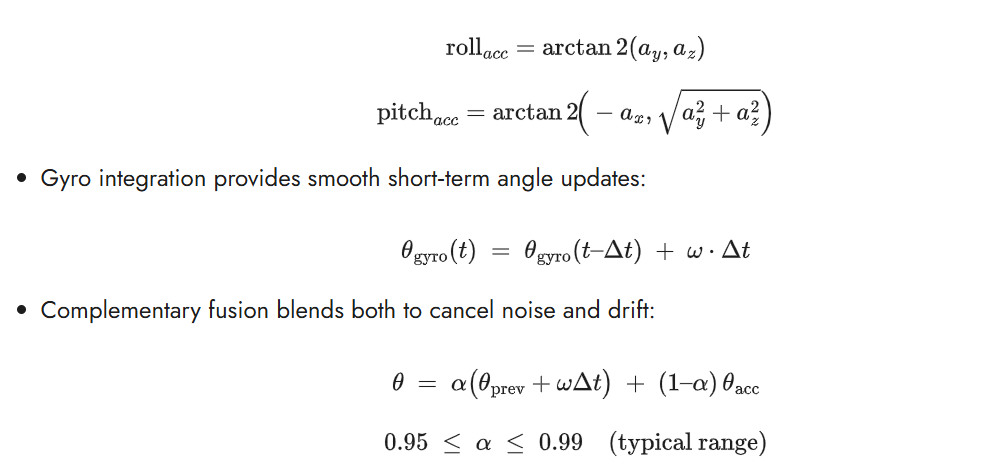
The MPU6050 is a 6‑DoF MEMS inertial module that integrates a 3‑axis accelerometer and a 3‑axis gyroscope with an I2C interface, optional onboard motion processing, and configurable measurement ranges. The accelerometer senses specific force (including gravity) along X, Y, Z; the gyroscope senses angular velocity about those axes, enabling full 3D motion tracking when data are fused.
How It Works?
- Accelerometer tilt angles (gravity reference) use trigonometry, for example pitch and roll from static gravity:
Why Fusion Improves Accuracy?
- The accelerometer is an absolute reference to gravity (low drift) but noisy and sensitive to vibration and linear motion.
- The gyroscope is low‑noise and responsive (great dynamics) but drifts over time due to bias and temperature.
- Fusing them yields fast, smooth, and long‑term stable angles; advanced filters (Kalman, Mahony, Madgwick) and the MPU6050’s DMP can further improve robustness.
Types of Angle Meters: Digital vs. Mechanical vs. Smartphone Apps
Digital angle meters (Arduino/IMU, electronic inclinometers)
- Pros: High resolution and repeatability; real‑time display/logging; absolute/relative zero; easy integration with CNC, robotics, and QA; customizable features like alarms and wireless.
- Cons: Require power; need calibration; may drift (gyro) or be affected by vibration; EMI and mounting can influence readings.
Mechanical tools (protractors, bevel gauges, spirit/bubble inclinometers)
- Pros: No batteries; robust, simple, and inexpensive; reliable for static setups; immune to electronic interference.
- Cons: Lower precision and slower workflow; parallax and human reading error; limited data/logging; difficult to automate or integrate.
Smartphone apps (using phone IMU)
- Pros: Ubiquitous and convenient; good for quick checks; can share screenshots/data; some offer calibration and averaging.
- Cons: Sensor quality and calibration vary across models; magnetic and environmental interference; case geometry/mounting inconsistency; less suitable for metrology‑grade work.
Source Code
#include <Wire.h>
#include <LiquidCrystal_I2C.h>
#include <MPU6050_light.h>

MPU6050 mpu(Wire);
LiquidCrystal_I2C lcd(0x27, 20, 4);

const int buttonPin = 3;
float angleOffset = 0;
bool buttonState = false;
bool lastButtonState = false;
float smoothedAngle = 0;
float alpha = 0.1;
unsigned long lastUpdateTime = 0;
const unsigned long updateInterval = 300; // ms

void showIntroScreen() {
  lcd.clear();
  // Center "Angle Meter"
  const char* line1 = "ANGLE METER";
  lcd.setCursor((20 - strlen(line1)) / 2, 0);
  lcd.print(line1);

  // Center "Made By"
  const char* line2 = "MADE BY";
  lcd.setCursor((20 - strlen(line2)) / 2, 1);
  lcd.print(line2);

  // Center "Electro Gadget"
  const char* line3 = "ELECTRO GADGET";
  lcd.setCursor((20 - strlen(line3)) / 2, 2);
  lcd.print(line3);

  delay(2000);
  lcd.clear();
}

void setup() {
  pinMode(buttonPin, INPUT_PULLUP);
  Wire.begin();
  Serial.begin(9600);
  lcd.init();
  lcd.backlight();

  showIntroScreen();

  // Center "Initializing..."
  const char* initMsg = "Initializing...";
  lcd.setCursor((20 - strlen(initMsg)) / 2, 1);
  lcd.print(initMsg);

  mpu.begin();
  delay(1000);
  mpu.calcOffsets(true, true);

  lcd.clear();

  // Center "MPU6050 Ready"
  const char* readyMsg = "MPU6050 READY";
  lcd.setCursor((20 - strlen(readyMsg)) / 2, 1);
  lcd.print(readyMsg);

  delay(1000);
  lcd.clear();

  // Print static UI elements: title on row 0
  lcd.setCursor(4, 0);
  lcd.print("ANGLE METER");

  // Angle and Offset labels shifted to rows 2 and 3 respectively
  lcd.setCursor(0, 2);
  lcd.print("ANGLE: ");

  lcd.setCursor(0, 3);
  lcd.print("OFFSET:");

  smoothedAngle = 0;
}

void loop() {
  mpu.update();
  buttonState = (digitalRead(buttonPin) == LOW);
  if (buttonState && !lastButtonState) angleOffset = mpu.getAngleX();
  lastButtonState = buttonState;

  float rawAngle = mpu.getAngleX() - angleOffset;
  smoothedAngle = alpha * rawAngle + (1 - alpha) * smoothedAngle;

  unsigned long currentTime = millis();
  if (currentTime - lastUpdateTime >= updateInterval) {
    lastUpdateTime = currentTime;

    // Update only the angle value field on row 2
    lcd.setCursor(7, 2);
    char angleStr[6];
    snprintf(angleStr, sizeof(angleStr), "%4d%c ", (int)smoothedAngle, 223);
    lcd.print(angleStr);

    // Update only the offset field on row 3
    lcd.setCursor(8, 3);
    char offsetStr[6];
    snprintf(offsetStr, sizeof(offsetStr), "%4d%c ", (int)angleOffset, 223);
    lcd.print(offsetStr);
  }
}Working Principle & Data Processing
Here’s a concise, practical workflow for processing MPU6050 data into stable tilt angles and the key calibration steps to keep readings accurate in real-world use cases.
How Does the Angle Calculation Work?
The project is built around an Arduino Nano (or similar board), an MPU6050 sensor for angle detection, and a 20×4 I²C LCD for display. A push-button is also included to calibrate or reset the angle reference point.
1. Initialization
- When powered on, the LCD shows an introductory splash screen (“ANGLE METER – MADE BY – ELECTRO GADGET”).
- The MPU6050 sensor is initialized, and its offsets are calculated to reduce measurement drift.
- The LCD then displays “MPU6050 READY” followed by a permanent user interface with the project title, angle field, and offset field.
2. Sensor Data Acquisition
- The MPU6050_light library continuously reads acceleration and gyroscope values from the MPU6050.
- Using sensor fusion, it calculates the X-axis angle (getAngleX), which represents tilt/rotation.
3. Calibration with Push Button
- A push button connected to pin 3 allows the user to set the current sensor orientation as zero.
- When pressed, the current angle is stored as
angleOffset. - Future angle calculations subtract this offset so that the display shows angles relative to the calibrated position.
4. Angle Smoothing
- Raw sensor values are often noisy. To stabilize readings, the code applies an exponential moving average filter:
smoothedAngle = α × rawAngle + (1 – α) × previousSmoothedAngle - Here,
alpha = 0.1, meaning the display updates smoothly without jitter while still being responsive.
5. LCD Display Updates
- Every 300 milliseconds (
updateInterval), the LCD updates only the numeric values (not the static labels). - The current smoothed angle is displayed on row 2 in degrees (° symbol).
- The offset angle is displayed on row 3, showing the calibrated zero reference.
6. Overall Operation
- The system continuously monitors tilt/rotation of the MPU6050.
- The user can recalibrate the “zero degree” reference at any time by pressing the button.
- The smoothed angle is then displayed in real-time on the LCD, making the device act as a digital angle meter / inclinometer.
Troubleshooting & Testing Your Angle Meter
Even with careful wiring and coding, your angle meter project may face a few common problems. Below are the typical issues and their actionable solutions:
Advantages of a DIY Arduino-based Angle Meter
- Accuracy Digital sensors like the MPU6050 can offer high precision, often to a fraction of a degree, surpassing the accuracy of many manual tools.
- Portability The small form factor of the Arduino and MPU6050 allows for a compact, portable device that can be used in various settings, from workshops to field applications.
- Digital Integration Unlike traditional analog tools, a digital angle meter can easily interface with other electronic systems. This enables functionalities such as data logging, real-time monitoring on a computer, and integration into larger robotics or automation projects.
- Customization Being a DIY project, you can tailor it to your specific needs. This includes choosing the display type (LCD, OLED), adding features like wireless data transmission, or programming custom functionalities.
Applications of Arduino-based Angle Meter
Digital angle meters are used in a wide range of applications, including:
- Construction and Carpentry Ensuring surfaces are level and angles are correct.
- Mechanical Engineering Aligning machinery and parts.
- Automotive Setting wheel alignment and other vehicle angles.
- Robotics Providing orientation feedback for robotic arms and mobile robots.
Frequently Asked Questions
How accurate is an Arduino angle meter?
Accuracy depends on calibration, vibration, and filtering; with proper offsets and a complementary filter, stable static tilt readings suitable for sub‑degree to low‑degree tasks are achievable on resource‑constrained MCUs.
Can the MPU6050 measure angles in 3D?
It can estimate pitch and roll absolutely via gravity, but absolute yaw requires a magnetometer; otherwise yaw drifts over time, so pair with HMC5883L (9‑DoF) for true 3D heading.
Best practices for minimizing drift?
Warm up the sensor, calibrate gyro/accel offsets, use a complementary filter with tuned alpha, keep consistent sample timing, and re‑zero on a reference during long sessions.
Application ideas beyond DIY projects?
Use in robotics, drones, and wearable or alignment tools where lightweight, real‑time orientation tracking and logging are needed on microcontrollers.
How to calibrate the MPU6050 for best results?
Run a still calibration to measure gyro bias and accelerometer offsets (e.g., IMU_Zero or 6‑position routine), then apply those offsets in code before fusion.
Is this project suitable for beginners?
Yes—mature Arduino libraries and tutorials make wiring, reading XYZ data, and basic fusion approachable with step‑by‑step examples.
Can it integrate with IoT or data logging?
Yes—ESP8266/ESP32 guides show streaming IMU data to dashboards or files, enabling remote monitoring and analysis with the same fusion approach.
Summary
This Arduino and MPU6050 angle meter project offers an affordable, accurate, and portable solution to measure tilt angles with sub-degree precision after proper calibration and sensor fusion. It benefits makers, students, and engineers by providing hands-on experience in IMU sensor integration, data filtering, and embedded programming. Practical uses include workshop tool alignment, robotics orientation feedback, structural monitoring, and educational demonstrations of sensor fusion principles, making it a versatile platform for learning and prototyping in modern electronics and embedded systems.