The KY-002 is a vibration switch module found in 37-in-1 and similar Arduino sensor kits (Keyes, ELEGOO, Sunfounder, and others) — also sold individually as the HW-513 and SW-18015P. It detects shaking, knocking, and impact using a conductive spring contact that briefly closes the circuit when vibrated.
The module operates on 3.3–5V, making it compatible with Arduino Uno, Nano, Mega, ESP32, ESP8266, Raspberry Pi, and other common platforms.
Most KY-002 boards use a pull-down resistor: the signal pin idles LOW and goes HIGH on vibration. Some variants (including some HW-513 boards) use a pull-up resistor and behave the opposite — idle HIGH, LOW on vibration. Check your board or test with Serial.println() before writing your logic.
Because each contact lasts only a few milliseconds, a plain digitalRead() in loop() will routinely miss quick knocks. Reliable detection requires either interrupt-driven code or a debounce window — both covered below.
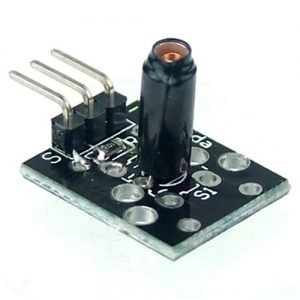
KY-002 Specifications
This module consists of a conductive spring, a 10k resistor, and 3 male header pins. Knocking or shaking the module will cause the spring to momentarily close the circuit.
| Operating Voltage | 3.3–5V |
| Output | Digital |
| Sensor element | Conductive spring + 10 kΩ resistor |
| Board Dimensions | 18.5mm x 15mm [0.728in x 0.591in] |
| Also known as | HW-513, SW-18015P |
KY-002 Vibration Sensor Pinout
The KY-002 has three pins. Reading left to right with the sensor element facing you:
| Pin | Label | Description |
|---|---|---|
| 1 | S | Signal output — HIGH on vibration (pull-down variant) or LOW on vibration (pull-up variant) |
| 2 | middle | VCC — connect to 3.3V or 5V |
| 3 | – | GND |
Connection Diagram
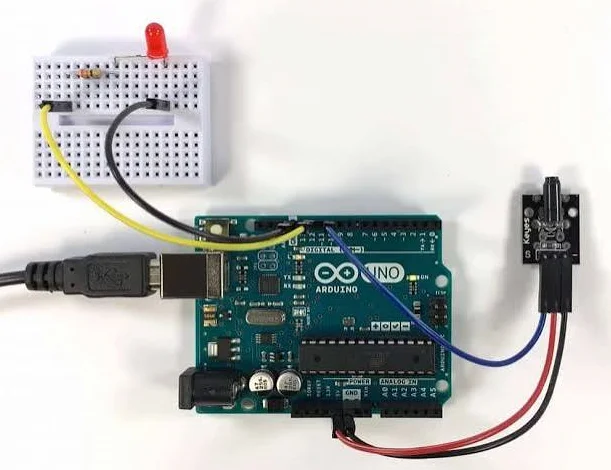
Connect the module signal pin (S) to pin 3 on the Arduino.
Then connect the module’s power pin (middle) and ground (-) to +5V and GND on the Arduino respectively.
| KY-002 | Arduino |
|---|---|
| S | Pin 3 |
| middle | +5V |
| – | GND |
KY-002 Arduino Code
The KY-002 is a momentary switch — the spring contact closes for just a few milliseconds per knock. The three sketches below go from simplest to most reliable.
Basic Read
Reads the signal pin on every loop iteration. Simple to follow, but will miss fast knocks — use the debounced or interrupt sketch for anything beyond experimentation.
int ledPin   = 13;   // onboard LED
int shockPin = 3;    // KY-002 signal pin (S)
int val;             // holds the sensor reading

void setup() {
  pinMode(ledPin, OUTPUT);
  pinMode(shockPin, INPUT);   // KY-002 has its own resistor, plain INPUT is fine
}

void loop() {
  val = digitalRead(shockPin);   // HIGH when the spring closes (vibration)
  if (val == HIGH) {
    digitalWrite(ledPin, HIGH);  // light the LED while vibration is detected
  } else {
    digitalWrite(ledPin, LOW);
  }
}Debounced Read
When the KY-002 spring closes, it doesn’t make clean contact once — it bounces mechanically, toggling HIGH and LOW several times in quick succession before settling. Without debouncing, a single knock can trigger your code 5–10 times.
This sketch records the millis() timestamp each time it acts on a HIGH reading. On every loop iteration it checks two conditions: the pin must be HIGH, and at least 50 ms must have passed since the last trigger (millis() - lastTrigger > DEBOUNCE). Because it uses millis() rather than delay(), the rest of your code keeps running between knocks.
const int shockPin = 3;
const int ledPin   = 13;
unsigned long lastTrigger = 0;
const unsigned long DEBOUNCE = 50; // ms

void setup() {
  pinMode(ledPin, OUTPUT);
  pinMode(shockPin, INPUT);
  Serial.begin(9600);
}

void loop() {
  if (digitalRead(shockPin) == HIGH && millis() - lastTrigger > DEBOUNCE) {
    lastTrigger = millis();
    Serial.println("Vibration detected!");
    digitalWrite(ledPin, HIGH);
    delay(200);
    digitalWrite(ledPin, LOW);
  }
}
Interrupt-Driven
An interrupt is a hardware signal that tells the CPU to stop what it’s doing and immediately run a specific function — the ISR (interrupt service routine). attachInterrupt(digitalPinToInterrupt(shockPin), onShock, RISING) tells the Arduino to call onShock() the instant pin 2 goes from LOW to HIGH. Unlike polling, this fires even if loop() is busy with other work.
The ISR itself is just hit = true — ISRs must be as short as possible since they block everything else while running. The volatile keyword tells the compiler not to cache hit in a register, so loop() always reads the value the ISR actually wrote. The 50 ms check in loop() then debounces the signal before acting. Use pin 2 or 3 on Uno/Nano; on ESP32 any GPIO supports interrupts.
const byte shockPin = 2;    // interrupt-capable pin (2 or 3 on Uno/Nano)
const byte ledPin   = 13;
volatile bool hit   = false; // set inside the ISR
unsigned long last  = 0;

void onShock() { hit = true; }  // ISR — keep it tiny

void setup() {
  pinMode(ledPin, OUTPUT);
  pinMode(shockPin, INPUT);
  Serial.begin(9600);
  attachInterrupt(digitalPinToInterrupt(shockPin), onShock, RISING);
}

void loop() {
  if (hit && millis() - last > 50) {  // 50 ms debounce window
    last = millis();
    hit  = false;
    Serial.println("Vibration detected!");
    digitalWrite(ledPin, HIGH);
    delay(200);
    digitalWrite(ledPin, LOW);
  }
}KY-002 Shock Switch Applications
The small form factor and low power draw of the KY-002 make it a practical choice wherever motion, impact, or vibration needs to trigger an action.
- Security and anti-theft — Attach the module to a door, window, drawer, or mailbox to detect tampering. Combine with a buzzer or wireless module to send an alert when unexpected movement is detected.
- Knock-to-activate — Use a knock pattern (e.g. two quick taps) to toggle a relay, wake a display, or unlock a mechanism — a low-cost alternative to a keypad.
- Tilt and impact detection — The spring responds to both vibration and sudden angular changes, making it suitable for detecting drops, collisions, or improper handling of packaged goods.
- Wake from deep sleep — On ESP32/ESP8266, wire the signal pin to a wake-up GPIO. Any knock wakes the microcontroller from deep sleep, keeping battery-powered projects running for months.
- Vibration alarm — Mount on machinery, pipes, or vehicles. Sustained or repeated vibration (tracked in code via timing logic) can trigger a warning before mechanical failure occurs.
Troubleshooting & FAQ
How do I identify which KY-002 variant I have, and why does it always read HIGH or LOW?
Upload a sketch that prints the raw pin value over Serial with no vibration applied. LOW at rest → HIGH on vibration = pull-down variant (most common). HIGH at rest → LOW on vibration = pull-up variant. Boards labelled HW-513 are often pull-up, but always test first. If the pin is stuck HIGH: either gravity is keeping the spring pressed (reorient the module), or you have a pull-up variant wired with pull-down logic — swap the HIGH/LOW check in your sketch. If the pin is stuck LOW on a pull-down variant: the signal is not reaching the microcontroller — check that S is on a digital pin (not analog-only), confirm your wiring, and try a different jumper wire.
What is the difference between the KY-002, HW-513, and SW-420?
The KY-002 and HW-513 are the same module sold under different names — both use a spring contact with fixed sensitivity and no adjustable components. The SW-420 is a different module: it includes an LM393 comparator and a potentiometer, letting you tune the vibration threshold with a screwdriver. Choose the SW-420 if you need adjustable sensitivity; the KY-002 is simpler and more compact.
The sketch misses knocks or detects unreliably
The spring contact closes for only a few milliseconds. If your sketch uses digitalRead() inside loop() alongside delay() calls or other blocking code, it will miss short contacts. Switch to the interrupt-driven sketch above — attachInterrupt() fires the moment the spring closes, regardless of what loop() is doing.
The sensor triggers false alarms or fires at power-on
Nearby motors, fans, or footsteps can trigger the module through the mounting surface. Try: (1) mounting on a foam or rubber pad to dampen ambient vibration; (2) increasing the debounce window (e.g. 100 ms instead of 50 ms); (3) requiring two triggers within a short time window before acting. For the power-on bounce specifically, add delay(500) in setup() before calling attachInterrupt().
How do I detect a specific knock pattern?
Use the interrupt sketch as a base. In the ISR, record each hit timestamp in a small array. In loop(), check whether the required number of hits occurred within the target time window using millis() — if so, trigger your action and reset the array. This reliably captures every knock because the interrupt fires independently of what loop() is doing.
Where should I mount the KY-002?
Mount the module directly on the object you want to monitor, not on a nearby fixed surface. Orient it so the spring can move freely in the direction of expected vibration — flat on a door, drawer, or window frame works well for anti-theft use. Avoid mounting on thick metal surfaces, which can dampen vibration before it reaches the spring.
Can the KY-002 work with 3.3 V boards like ESP32, ESP8266, or Wemos D1 Mini?
Yes. The KY-002 runs on 3.3–5 V, so no level shifting is needed. Connect the middle pin to 3.3 V, – to GND, and S to any GPIO. On the ESP32, every GPIO pin supports attachInterrupt(). On ESP8266 and Wemos D1 Mini, most pins work — avoid GPIO16, which does not support interrupts. The same interrupt sketch runs on all three without modification.
Which sensor kit includes the KY-002?
The KY-002 vibration switch is included in the popular 37-in-1 Arduino sensor kit, available from several manufacturers including Keyes, ELEGOO, Sunfounder, and others. The exact modules in each kit can vary by seller and edition, so check the contents list before buying.
KY-002 vs Similar Modules
Not sure which vibration or motion sensor fits your project? Here is how the KY-002 compares to similar modules in the same category.
| Module | Sensitivity | Choose when |
|---|---|---|
| KY-002 / HW-513 (this page) | Fixed | Simple vibration or shock detection |
| SW-420 | Adjustable (potentiometer) | Tunable sensitivity without code changes |
| KY-031 | Fixed | Detecting sharp knocks or impacts specifically |
| KY-020 | Fixed | Detecting orientation change or tilt, not vibration |