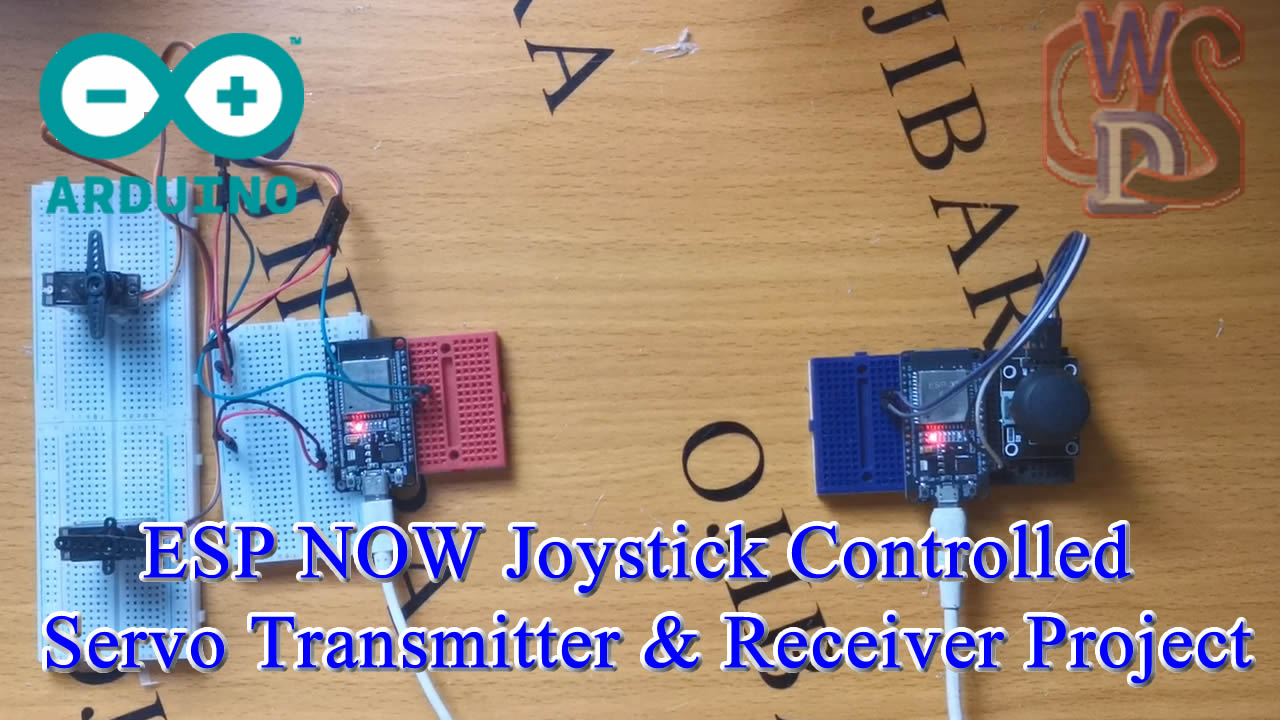
Controlling multiple servos wirelessly using ESP-NOW is the gold standard for high-performance RC projects. Unlike Wi-Fi, which requires a router and a slow “handshake,” ESP-NOW allows two ESP32 or ESP8266 boards to talk directly to each other with near-zero latency.
In this project, we’ll build a transmitter with a joystick and a receiver that controls two servo motors (ideal for a pan-tilt camera or a robotic arm).
Video Explanation
1. Project Requirements
- Microcontrollers: 2x ESP32 (recommended) or ESP8266.
- Input: 1x Analog Joystick Module.
- Output: 2x SG90 or MG996R Servo Motors.
- Power: 5V/2A power supply (Servos draw high current).
- Library:
ESP32Servo(if using ESP32).
2. Wiring Diagram
Transmitter (Remote Control)
- VCC/GND → ESP32 3.3V and GND.
- VRx (X-axis) → GPIO 34 (ADC1).
- VRy (Y-axis) → GPIO 35 (ADC1).
Receiver (Servo Node)
- Servo 1 (Pan) → Signal to GPIO 18.
- Servo 2 (Tilt) → Signal to GPIO 19.
- External Power → Connect the servos’ Red/Brown wires to an external 5V source. Common Ground: Connect the external GND to the ESP32 GND.
3. The Code Logic
ESP-NOW works by sending a “Data Structure.” We bundle the X and Y coordinates into one package and send it to the receiver’s MAC Address.
Part A: Get the Receiver’s MAC Address
Mac Address Code
#include "esp_mac.h"

void setup() {
  Serial.begin(115200);

  uint8_t baseMac[6];
  // Get the factory-assigned MAC address
  esp_read_mac(baseMac, ESP_MAC_WIFI_STA);

  Serial.printf("MAC: %02X:%02X:%02X:%02X:%02X:%02X\n",
                baseMac[0], baseMac[1], baseMac[2],
                baseMac[3], baseMac[4], baseMac[5]);
}

void loop() {}Upload a simple “MAC Address Finder” sketch to your receiver board. Open the Serial Monitor to find the address (e.g., B4:E6:2D:E2:43:8C). You will need this for the transmitter code.
Part B: Transmitter Code (Joystick)
#include <esp_now.h>
#include <WiFi.h>

typedef struct struct_message {
  int xValue;
  int yValue;
} struct_message;

struct_message dataToSend;

uint8_t receiverAddress[] = {0x00, 0x4B, 0x12, 0xE7, 0xA8}; // Replace with your receiver MAC

void setup() {
  Serial.begin(115200);
  WiFi.mode(WIFI_STA);

  if (esp_now_init() != ESP_OK) {
    Serial.println("ESP-NOW init failed!");
    return;
  }

  esp_now_peer_info_t peerInfo = {};
  memcpy(peerInfo.peer_addr, receiverAddress, 6);
  peerInfo.channel = 0;
  peerInfo.encrypt = false;

  if (esp_now_add_peer(&peerInfo) != ESP_OK) {
    Serial.println("Failed to add peer");
    return;
  }
}

void loop() {
  dataToSend.xValue = analogRead(34); // Joystick X pin
  dataToSend.yValue = analogRead(35); // Joystick Y pin

  esp_now_send(receiverAddress, (uint8_t *) &dataToSend, sizeof(dataToSend));
  Serial.print("Sent X: ");
  Serial.print(dataToSend.xValue);
  Serial.print(" | Y: ");
  Serial.println(dataToSend.yValue);
  delay(100);
}
Part C: Receiver Code (Servos)
#include <esp_now.h>
#include <WiFi.h>
#include <ESP32Servo.h>

Servo servo1;
Servo servo2;

int servo1Pin = 18;  // Adjust as needed
int servo2Pin = 19;

typedef struct struct_message {
  int xValue;
  int yValue;
} struct_message;

struct_message incomingData;

void onDataReceive(const esp_now_recv_info_t *info, const uint8_t *data, int len) {
  memcpy(&incomingData, data, sizeof(incomingData));

  Serial.print("X: ");
  Serial.print(incomingData.xValue);
  Serial.print(" | Y: ");
  Serial.println(incomingData.yValue);

  // Map joystick to servo angle
  int angleX = map(incomingData.xValue, 0, 4095, 0, 180);
  int angleY = map(incomingData.yValue, 0, 4095, 0, 180);

  servo1.write(angleX);
  servo2.write(angleY);
}

void setup() {
  Serial.begin(115200);
  WiFi.mode(WIFI_STA);

  servo1.attach(servo1Pin);
  servo2.attach(servo2Pin);

  if (esp_now_init() != ESP_OK) {
    Serial.println("ESP-NOW init failed!");
    return;
  }

  esp_now_register_recv_cb(onDataReceive);
}

void loop() {
  // Nothing to do here
}
🚀 Pro Tips for Smooth Movement
- Deadzone: Joysticks rarely return to a perfect center. Add a small “deadzone” in your code (e.g., if the value is between 85 and 95, set it to 90) to prevent jitter.
- External Power: Never power two servos directly from the ESP32’s 3.3V or 5V pins. The voltage sag will crash the ESP-NOW connection.
- Antenna Orientation: For maximum range, keep the PCB antennas of both ESP32 boards parallel to each other.
Would you like me to show you how to add a failsafe so the servos return to a neutral position if the signal is lost?