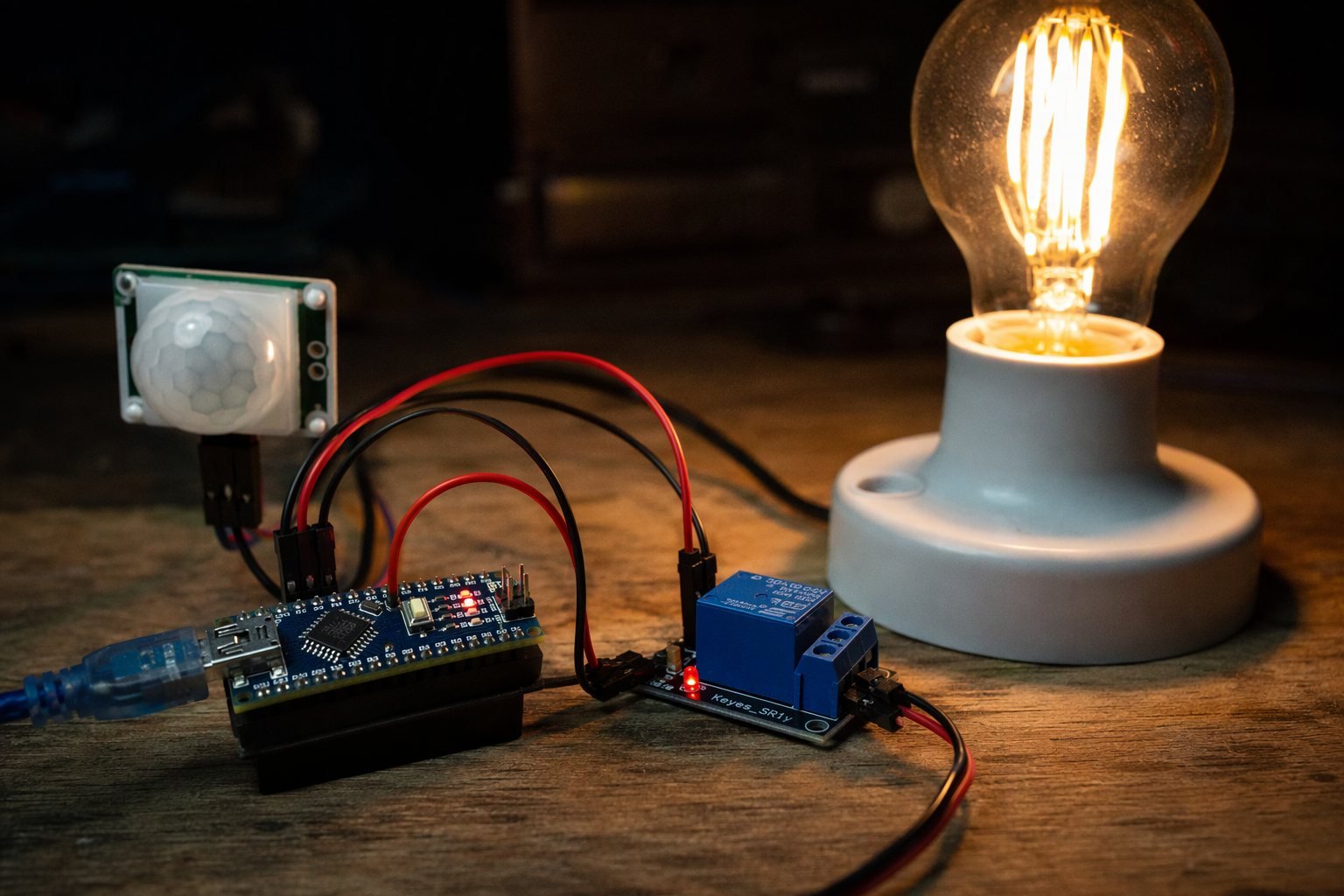
Walk into a room and the light turns on by itself, this classic automation trick needs only an Arduino, an HC-SR501 PIR motion sensor and a relay module. The PIR sensor detects the infrared heat signature of a moving person, and the Arduino switches the relay, which can control a real lamp, fan or alarm siren.
Safety first: this project can switch mains voltage. If you’ve never worked with AC wiring, use the relay to switch a 12V LED strip or a low-voltage lamp instead. Never touch the relay screw terminals while power is connected.
Components Required
- Arduino Nano (or Uno)
- HC-SR501 PIR motion sensor
- Single-channel 5V relay module
- Lamp or 12V LED strip as the load
- Breadboard and jumper wires
Circuit Diagram and Wiring

| GND | Relay | GND | Black |
The Code (Arduino IDE)
/*
 * Arduino PIR Motion-Activated Light
 * Ogbugbu Technologies - ogbugbu-technologies.com.ng/
 */
#define PIR_PIN 2
#define RELAY_PIN 7

const unsigned long ON_TIME = 60000UL;   // keep light on 60s after last motion

bool pirReady = false;
unsigned long readyAt = 0;
unsigned long lastMotion = 0;

void setup() {
  Serial.begin(9600);
  pinMode(PIR_PIN, INPUT);
  pinMode(RELAY_PIN, OUTPUT);
  digitalWrite(RELAY_PIN, LOW);          // light off
  Serial.println("Warming up PIR sensor (60s)...");
  readyAt = millis() + 60000UL;          // PIR needs 30-60s to stabilise
}

void loop() {
  if (!pirReady) {
    if ((long)(millis() - readyAt) >= 0) {
      pirReady = true;
      Serial.println("PIR ready.");
    }
    return;
  }

  if (digitalRead(PIR_PIN) == HIGH) {
    lastMotion = millis();
    digitalWrite(RELAY_PIN, HIGH);       // light ON
    Serial.println("Motion detected - light ON");
  }

  if (millis() - lastMotion > ON_TIME) {
    digitalWrite(RELAY_PIN, LOW);        // light OFF after timeout
  }
}
How the Code Works
A PIR sensor outputs garbage for its first 30–60 seconds while its pyroelectric element stabilises, so the sketch enforces a one-minute warm-up before it trusts any reading. Skipping this step is the number one reason builders think their sensor is broken.
The logic uses a lastMotion timestamp instead of a blocking delay(). Every time motion is seen, the timestamp refreshes and the light stays on; only when a full 60 seconds pass with no motion does the relay drop out. This means the light will never switch off while you’re still moving around the room. The two trim pots on the HC-SR501 set sensitivity and its internal trigger delay, start with both at mid-position.
Testing and Troubleshooting
Test the circuit with a plain LED connected to D7 first, then move to the relay. If the light turns on randomly, lower the sensitivity pot and keep the sensor away from heaters, radiators and direct sunlight. If it never triggers, check that the PIR jumper (on some boards) is set to H (repeat trigger) mode.
Conclusion
Motion-activated lighting saves energy and adds real security value to a home or shop. Extend it with an LDR so the light only fires at night, or add a second relay channel for an alarm buzzer.
Found this tutorial helpful? Share it with a fellow maker and check out more builds on Ogbugbu Technologies!